

Squarespace Member Directory: How to Add One (2026)
Last updated 14 July 2026

How To Add A Squarespace Member Directory
Quick Answer: Squarespace doesn't have a native member directory feature — even inside Member Areas, there's no built-in way for visitors to search or browse a list of members. To add one, you can either build a directory manually with blog posts and categories, or use a dedicated Squarespace directory plugin that turns your existing blog page into a searchable, filterable listing.
Why Doesn't Squarespace Have a Native Member Directory?
Squarespace's Member Areas are built for gating content — letting members log in and view what they've paid for or signed up for. They weren't designed to let visitors browse a list of members, resources, or profiles. If you run a membership site, association, charity, or resource hub and want people to search and filter entries, that's a gap you have to fill yourself.
Your Options for Building a Directory in Squarespace
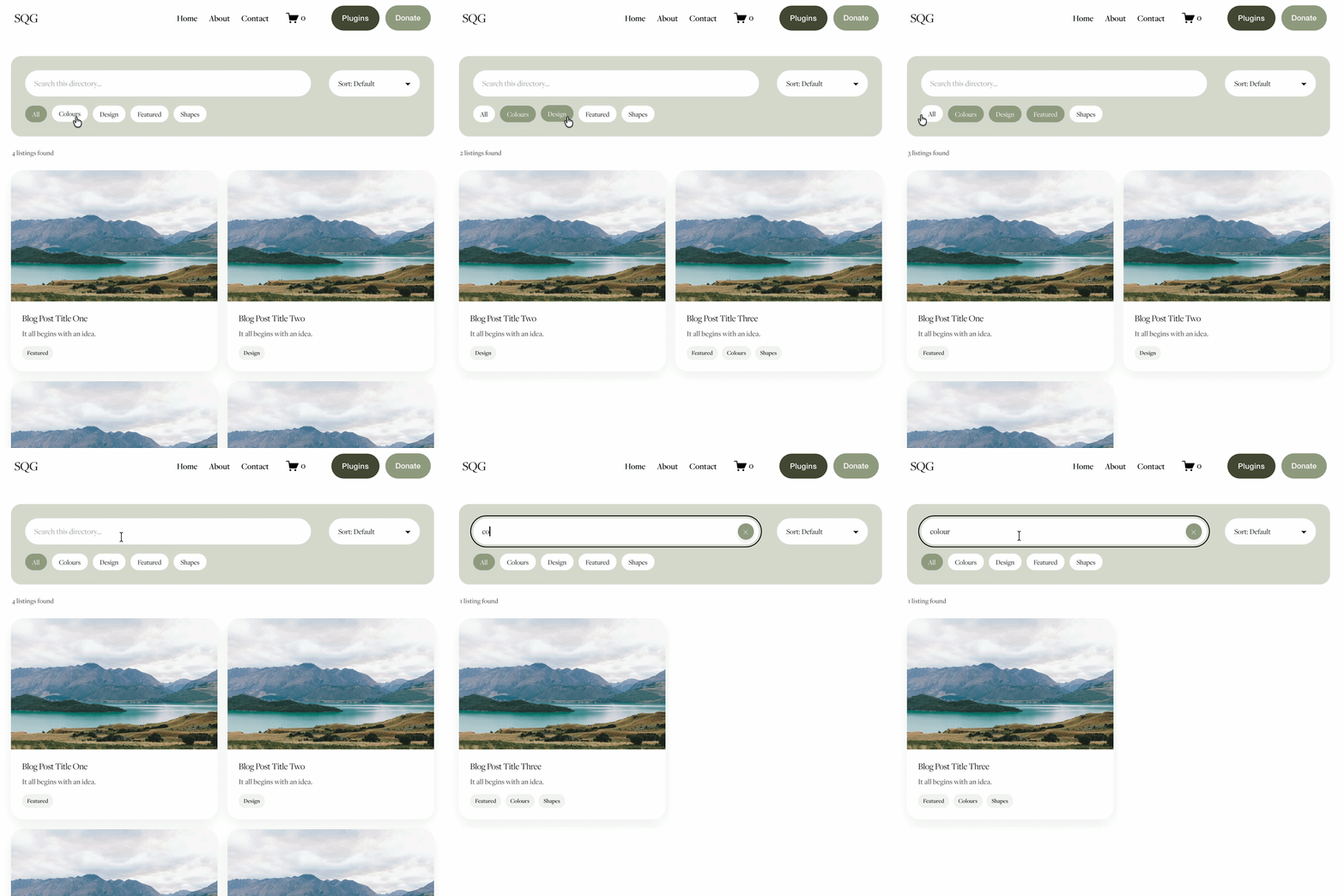
Building it manually. You can create a directory-style page using Squarespace's native blog functionality — each entry becomes a blog post, tagged and categorised so visitors can browse by topic. This works, but out of the box it looks and behaves like a blog feed: no dedicated search bar, no directory-style filtering, and nothing that visually separates it from your actual blog.
Using a directory plugin. A directory plugin builds on that same native blog page but layers a searchable, filterable directory experience on top — no custom build or ongoing developer support required. The Squarespace Directory Plugin lets visitors search and browse content like a real directory rather than scrolling a blog feed, while you manage entries the same way you'd manage any blog post.
What the Plugin Actually Does (and Doesn't)

The plugin uses Squarespace's native categories to power filtering — not Squarespace's separate tag system. If you're used to tagging blog posts, you'll need to organise directory entries by category instead. Beyond that, it's flexible enough to work for member directories, resource libraries, staff listings, or any content where visitors need to search and filter rather than scroll.
Who a Squarespace Directory Works Best For
Membership organisations and associations wanting a searchable member list, charities and nonprofits listing resources or partner organisations, agencies listing multiple profiles (staff, vendors, contributors), and any site with enough listings that a plain blog feed makes them hard to find.
Frequently Asked Questions
-
No. Squarespace's Member Areas let members log in and access gated content, but there's no native feature for visitors to search or browse a list of members or profiles.
-
Not with the Squarespace Directory Plugin — it filters using Squarespace's native categories rather than tags, so entries need to be organised by category.
-
Member directories, resource libraries, staff or vendor listings, and any content collection where visitors need to search and filter rather than scroll through a blog feed.
-
No. The plugin builds on Squarespace's existing blog page, so setup is copy-and-paste rather than a custom build.
-
Browse the full range of Squarespace plugins.

For more cool Squarespace tips check out my blog, or sign up to my newsletter.




Looking for an easy way to add filters to Squarespace?
The Genius Squarespace Filter Plugin helps you turn busy portfolio pages, blogs, event pages and galleries into a cleaner, easier to browse experience.
Visitors can quickly filter your content by category, topic, service, location, resource type or any labels you choose, instead of scrolling through everything.
Perfect for portfolios, blog archives, event listings, galleries (grid, masonry & strips only) resource hubs and larger content collections, this plugin gives your visitors a smoother way to explore your content without the cost or complexity of custom development.
Portfolio Filter Demo ➜
NEW Advanced Dropdown Portfolio Filter Demo ➜
Gallery Filter Demo ➜
Blog Filter Demo ➜
Event Filter Demo ➜
Key Features:
Simple to install and customise
Filter options for portfolio pages, galleries, blogs and events
Includes the new advanced dropdown portfolio filter
Ideal for Squarespace sites needing more in depth filtering options with a simple user experience
Beginner friendly setup with copy and paste instructions
Designed for Squarespace 7.1 websites