

Honest SEOSpace Review (2026): Is It the Best Squarespace SEO Plugin?
Last updated September 2026
Quick Answer: SEOSpace is an SEO plugin built specifically for Squarespace. It audits your site, scans individual pages, and gives you a prioritised list of fixes, plus keyword research and AI writing help. It's genuinely easy to use and the support is excellent, but it only improves your SEO if you put in regular time to act on its suggestions.
SEOspace The Squarespace SEO Plugin
My Detailed SEOSpace Review
Have you ever wondered what it takes to propel your Squarespace website to the forefront of search engine results? Me too! That’s why it was music to my ears when I first encountered the new SEO plugin for Squarespace websites - Enter SEOSpace, which is an acclaimed SEO Chrome plugin designed to elevate your Squarespace website's performance and secure a higher ranking on search engine pages.

The aim of the SEOSpace Squarespace SEO plugin offers a streamlined approach to accelerate SEO tasks, drive increased traffic, and ensure your website claims its rightful spot on page 1 of Google. So, does it do what it say’s on the tin? Here’s my detailed SEOSpace Review after using the plugin…

Does Squarespace Need an SEO Plugin?
Squarespace has solid SEO basics built in, including clean URLs, automatic sitemaps, SSL, mobile-friendly templates and editable page titles and descriptions. So you don't need a plugin to rank.
What Squarespace doesn't do is tell you what to fix. It won't audit your pages, flag missing alt text or weak titles, or suggest keywords. That's the gap an SEO plugin like SEOSpace fills. It turns SEO from guesswork into a to-do list.
How easy is SEOspace it to use?
In the first subject of my review of SEOSpace we’ll look at the ease of use.
I’ve been using the SEOSpace plugin for nearly 2 years now I find it extremely easy to follow. The set up itself takes less than a minute. Once that’s done and installed you can see the clear dashboard where you’ll find all your website/s information, including the option to do a full site wide audit which I find invaluable! I have many client websites that I optimise for SEO and so the audit gives a whole overview on the sites performance.
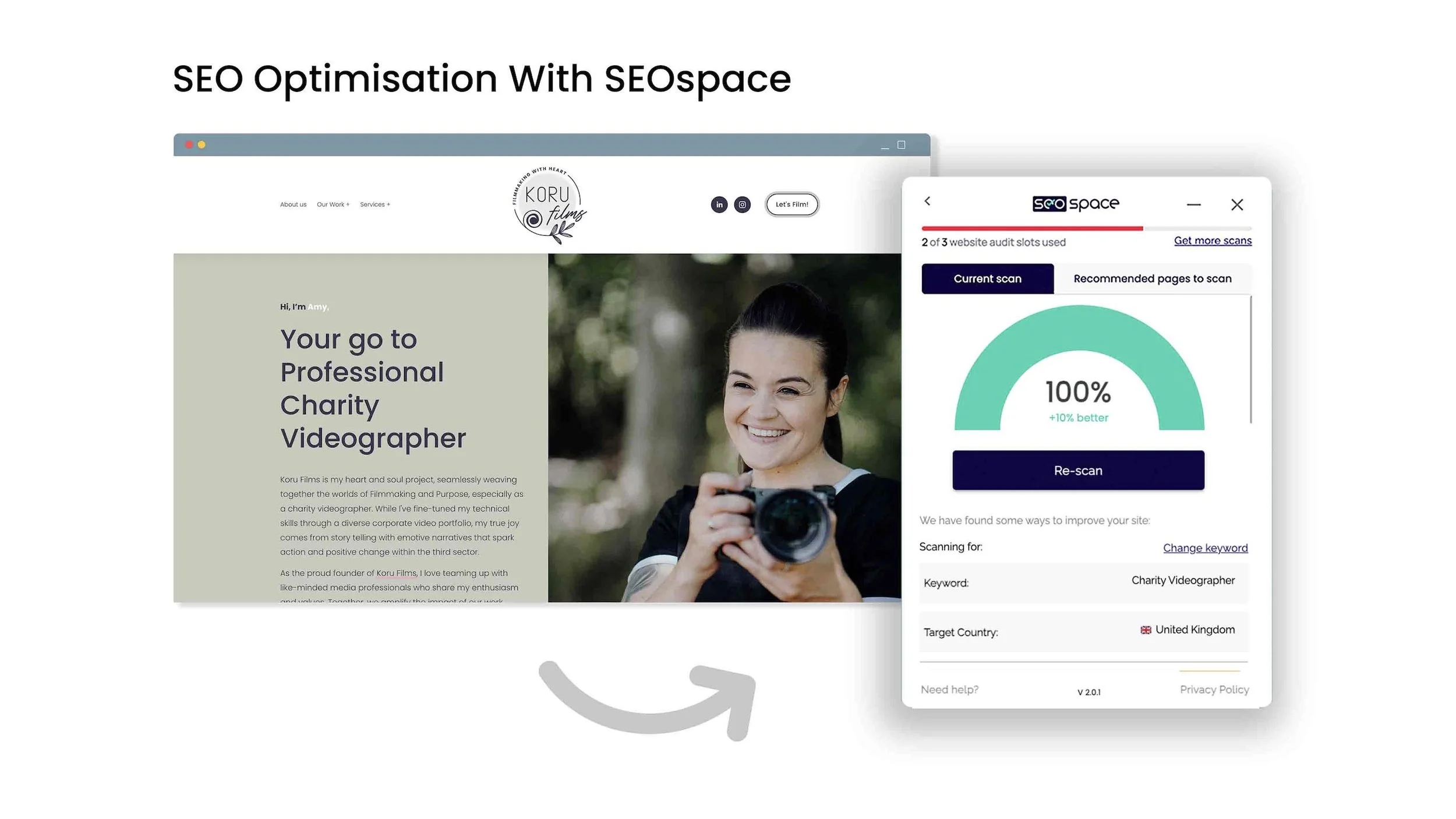
Doing individual scans for web pages is also very simple to do. Whilst on a Squarespace website (live site or editor mode) you can scan any website page to determine the SEO score, you can also search by ‘keyword’ if your on the DIY plan or above. Within the scan you will see a list of things to improve on to get your webpage fully optimised - and they are simple tasks! Nothing will take you hours to do, and the more you use the plugin the easier it gets.
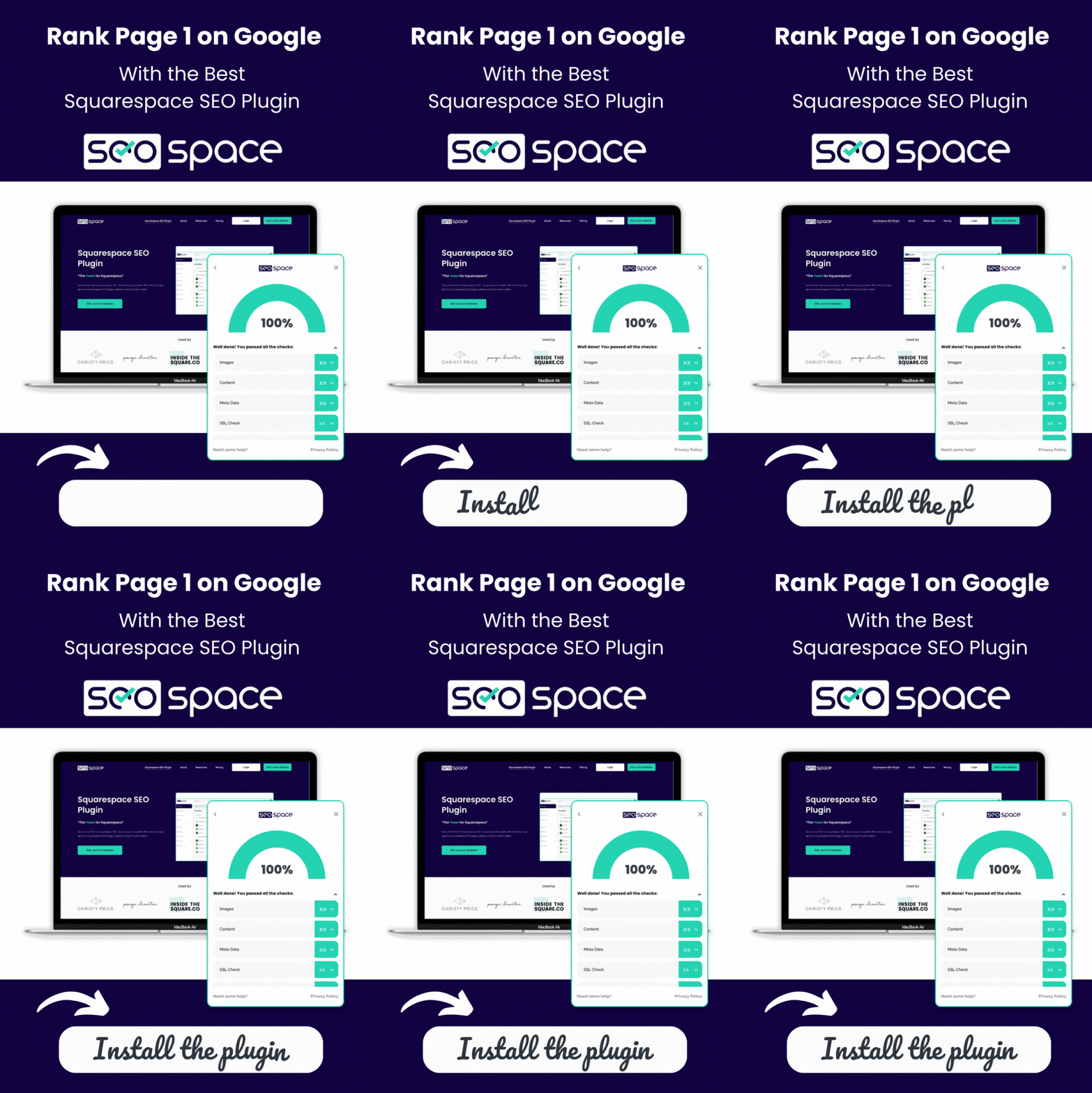
Overall this SEOSpace SEOSpace for Squarespace makes it really clear on what steps I need to take to improve my Squarespace website’s SEO. Take a look at the example video below to see a snapshot of how it works on page scans.
The more you engage with the plugin, the smoother the process becomes, making SEOSpace an indispensable tool for Squarespace users. Next in my SEOSpace review we’ll look at the key features of the plugin and how they work individually to help improve Squarespace SEO…
What are the key features of SEOSpace?
Here is a list of the main features of the SEOSpace plugin:
Simple Dashboard - Easy to navigate user dashboard with step by step guides on each element
Site-wide SEO audits - Quickly run a full site audit to see your SEO score and identify key areas for traffic growth
Webpage Scans - Scan individual pages within the Squarepace editor or on live Squarespace websites, to improve on the SEO score of a particular page - this is great for competitor sites! Get a sneak peak at how their SEO is performing
Prioritized SEO Tasks - All top SEO issues prioritized in your dashboard
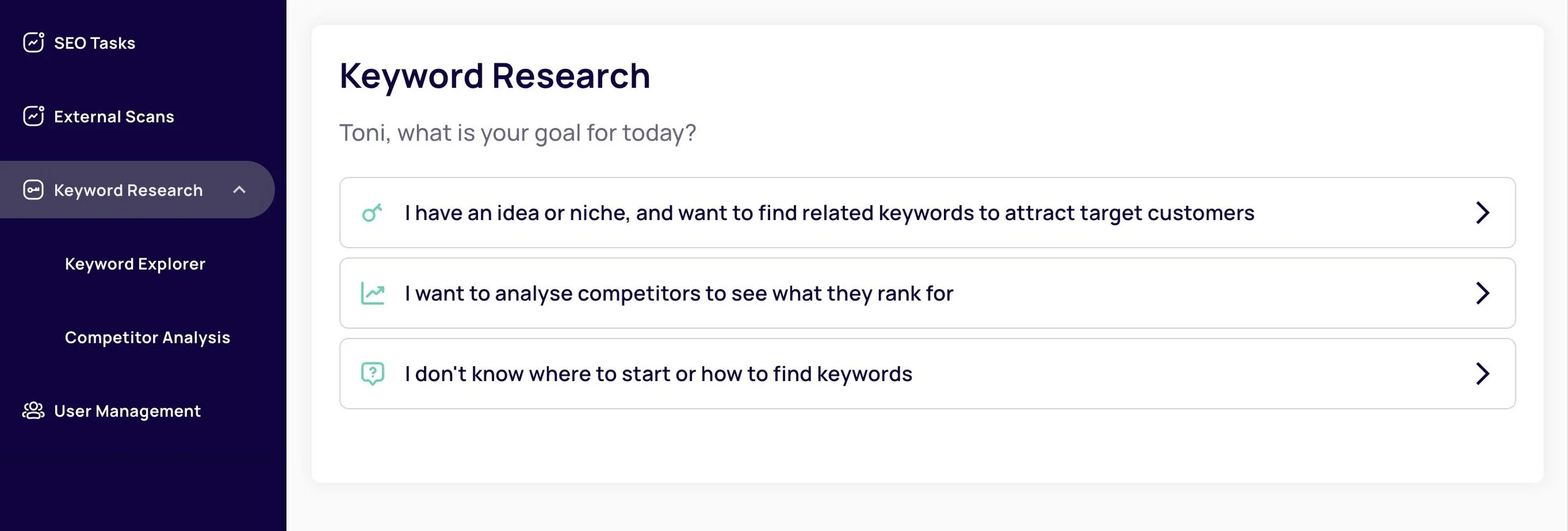
NEW* Keyword Research Tool- I love this new feature! You can search for relevant keywords and view the average volume and difficulty in ranking. This helps you build a great SEO strategy!
Automatic SEO monitoring - The ability to set up monthly automatic monitoring of your SEO
PDF SEO reports - The option to generate SEO reports - Perfect for web designers & agencies (Designer plan only)
UX Design - Great user experience and updated how to tutorials

How Much Does SEOSpace Cost in 2026?
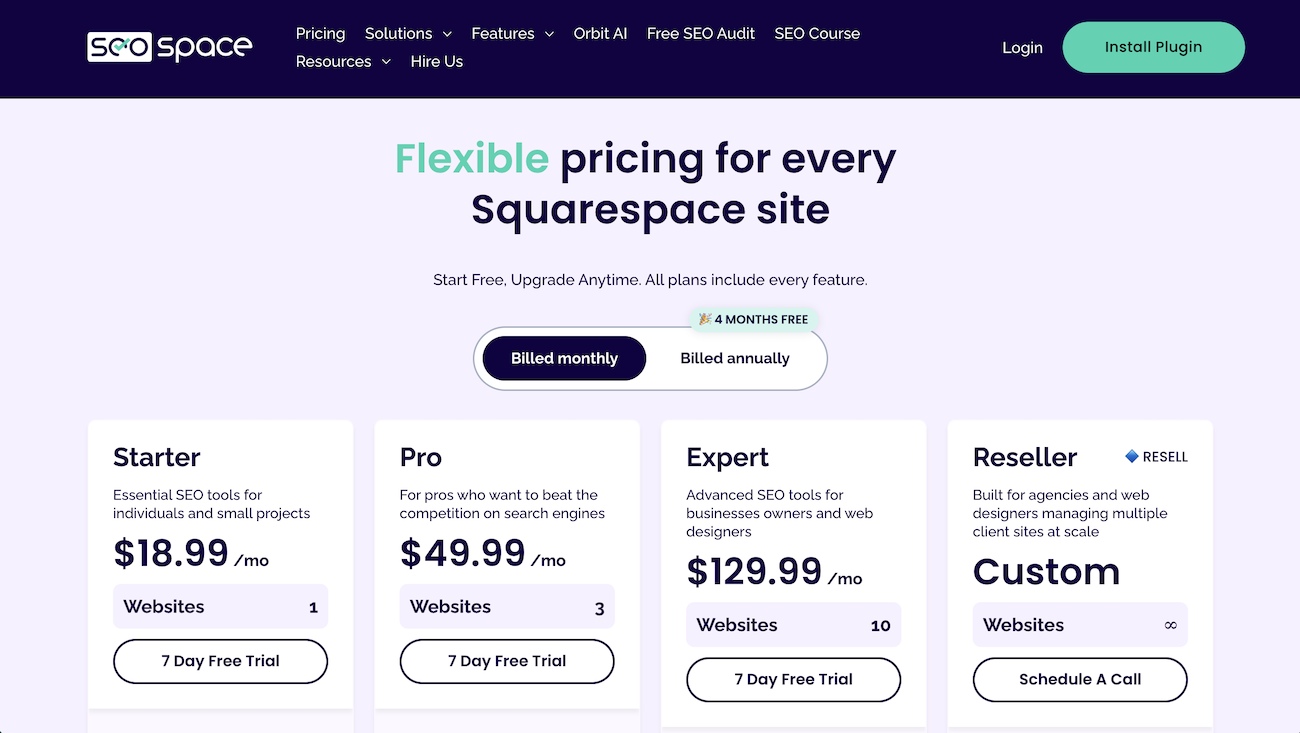
SEOSpace has changed its pricing since I first wrote this review. At the time of writing (September 2026), the plans are:
Free: scan up to 50 pages using the Chrome extension, a good way to try it out
Starter ($18.99/month): 1 website, audits up to 100 pages, 50 AI credits a month and 25 tracked keywords
Pro ($49.99/month): 3 websites, audits up to 500 pages, 200 AI credits a month and 100 tracked keywords, with the option to add extra users
Expert ($129.99/month): 10 websites, unlimited page audits, 500 AI credits, 500 tracked keywords and priority support
All paid plans come with a 7-day free trial. For most DIY site owners, Starter is plenty. Pro makes more sense if you're a designer looking after a few client sites.
Does SEOSpace have any bugs and glitches?
As part of my review of SEOSpace it would be wrong of me to state that the plugin doesn’t have its own little set of occasional bugs. Like most new software it requires user feedback to enable a better user experience. I can admittedly count on one hand the amount of issues I have faced with the plugin, with that said they are very minor bugs and glitches. For example I did face an issue where the page scanner was not registering my changes to a web page scan after I updated it as per the prompts. I reached out to the team and within a few hours it was completely sorted. In other rare cases I have noticed that the hover side icon to access the plugin sometimes disappeared, but I quickly realised that this was due to the size of the browser window so be sure to zoom out if that ever happens! Ultimately there has never been any issues where I’ve felt not heard by the team so hast off to them for that! I’ll go onto the team support in the next section of my review of SEOSpace…
How good is the customer support?
I hate to sound soooo positive here, but as briefly mentioned above, the support team at SEOSpace are by far one of the most speediest responders I have ever come across in terms of software providers. They are very keen to hear feedback from their users and take on board the advise of their customers which is great to see. This makes you feel incredibly valued as a customer and rightly so.
There is also a community forum specifically designed for SEOSpace customers where you can post questions about anything SEO related to the community. I have found this extremely useful for getting to know some insightful answers to common questions involving the SEO plugin and Squarespace SEO in general.
Does SEOspace Improve Your Squarespace SEO?
Lastly in my review of SEOSpace the biggest question you may be asking is does it improve Squarespace SEO? The answer is yes and no! Not helpful? Well, the reason for this is because for SEOSpace to be 100% in optimising your Squarespace site’s SEO it needs your effort - not a huge amount but some effort and a little time is required, however the reward for your time and effort is absolutely invaluable. When I talk about time, don’t panic, you don’t need to spend hours and hours on the plugin. For example if you spent around 1 hour per day optimizing different pages on your site, that will be more than sufficient to get your rankings growing, or even every other day is fine. Just make SEOSpace a ‘habit,’ a part of your work schedule - Plus the time needed will be different for everyone depending on your offerings. As a Squarespace designer I use the plugin on multiple sites, so I’m on it much longer than 1 hour per day, and this becomes a part of what my clients pay for within my services.
SEOSpace Pros and Cons
Pros
Very quick to set up, in under a minute
Clear dashboard with step-by-step guidance
Full site audits plus individual page scans
Built-in keyword research
Fast, genuinely helpful customer support and a friendly community forum
Cons
The price has gone up since earlier versions
You need to set aside regular time to act on its suggestions
A few minor glitches, though support resolved them quickly
Let’s round up my honest SEOSpace review
In conclusion; SEOSpace for Squarespace offers a practical and accessible solution for individuals and designers alike. Its impact on SEO efficiency, coupled with a supportive community and dedicated customer service, positions it as a valuable asset in the digital toolkit. Whether you're embarking on a trial or upgrading to a paid plan, SEOSpace provides a user-friendly journey towards enhancing your Squarespace website's SEO performance.
Want to try it yourself? SEOSpace offers a free plan and a 7-day free trial on all paid plans. Try SEOSpace here.
FAQS
-
SEOSpace is an SEO plugin made specifically for Squarespace websites. It audits your site, scans individual pages, suggests prioritised fixes and includes keyword research and AI writing tools.
-
For most Squarespace site owners and designers, yes, as long as you'll use it regularly. It makes SEO much easier to understand and act on, but it won't improve your rankings unless you make the changes it suggests.
-
As of September 2026, SEOSpace has a free plan, then paid plans starting at $18.99 a month for one website. All paid plans include a 7-day free trial.
-
No, but it helps. Squarespace has good built-in SEO basics, but it doesn't audit your pages or tell you what to improve. An SEO plugin fills that gap.
-
Yes. Squarespace includes clean URLs, sitemaps, SSL and editable SEO titles and descriptions. Rankings still depend on your content and how well each page is optimised.
-
Yes. All paid SEOSpace plans come with a 7-day free trial, and there's also a free plan that lets you scan up to 50 pages.
I hope you found my honest SEOSpace review useful. Check out even more Squarespace Tips to help you become a pro at Squarespace SEO!
Feel free to sign up to my newsletter for the latest hacks and tips straight to your inbox!
Want more from your existing Squarespace website? Check out my full SEO checklist:
Did I help you? Buy me a coffee as thanks!
Other articles you may be interested in:






Looking for an easy way to add filters to Squarespace?
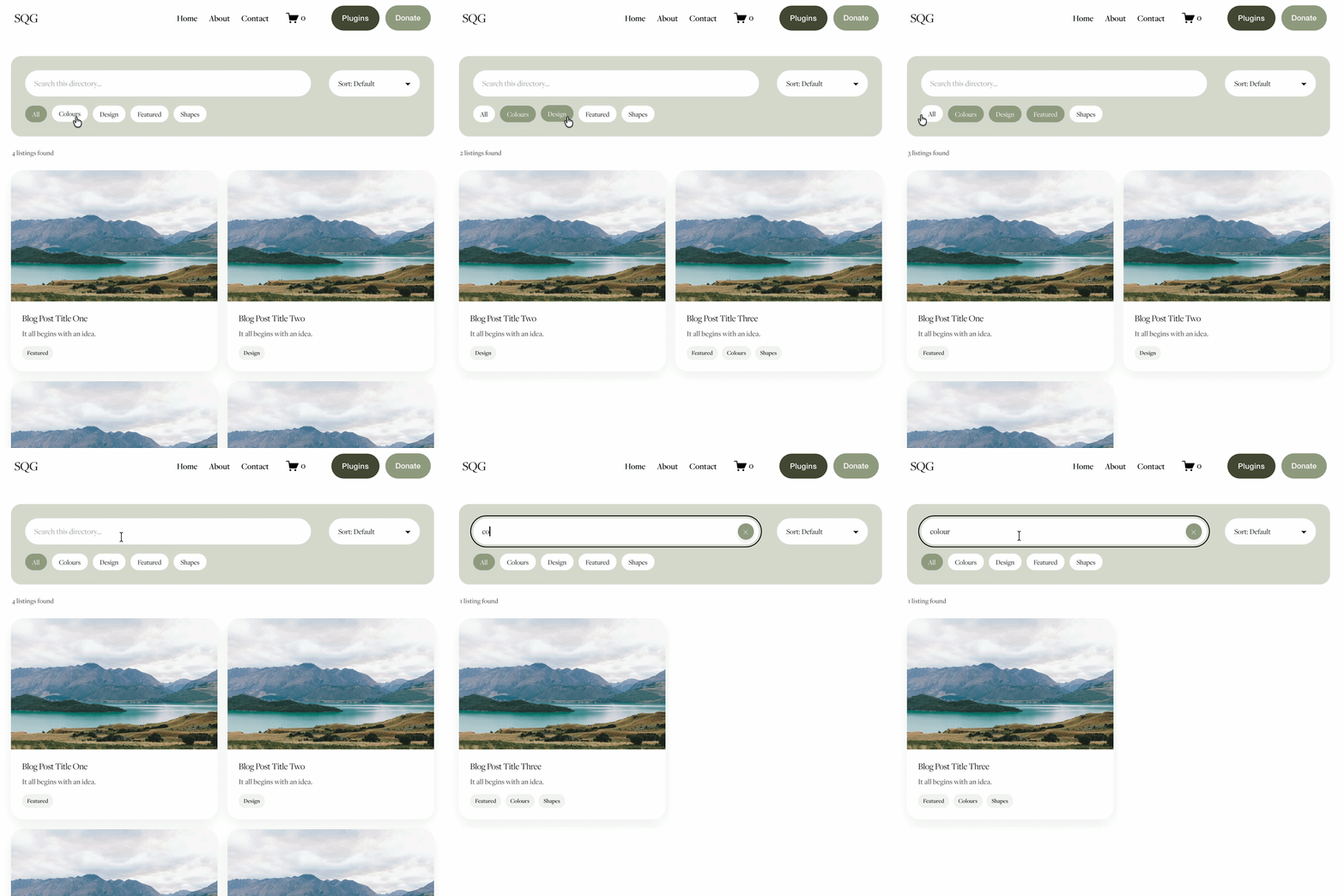
The Genius Squarespace Filter Plugin helps you turn busy portfolio pages, blogs, event pages and galleries into a cleaner, easier to browse experience.
Visitors can quickly filter your content by category, topic, service, location, resource type or any labels you choose, instead of scrolling through everything.
Perfect for portfolios, blog archives, event listings, galleries (grid, masonry & strips only) resource hubs and larger content collections, this plugin gives your visitors a smoother way to explore your content without the cost or complexity of custom development.
Portfolio Filter Demo ➜
NEW Advanced Dropdown Portfolio Filter Demo ➜
Gallery Filter Demo ➜
Blog Filter Demo ➜
Event Filter Demo ➜
Key Features:
Simple to install and customise
Filter options for portfolio pages, galleries, blogs and events
Includes the new advanced dropdown portfolio filter
Ideal for Squarespace sites needing more in depth filtering options with a simple user experience
Beginner friendly setup with copy and paste instructions
Designed for Squarespace 7.1 websites