

Best Squarespace Filter Plugin for Photographers (2026)
Last updated 1 June 2026

If you're a photographer with a Squarespace portfolio, you've probably run into the same problem: your work spans weddings, portraits, landscapes, commercial shoots — and visitors have no easy way to browse just what they're looking for. Squarespace doesn't offer native filtering for portfolio pages, which means without a plugin, your visitors are stuck scrolling through everything.
This guide covers the best way to add filtering to your Squarespace photography website in 2026 — without touching a single line of code.
Does Squarespace have a built-in portfolio filter?
No. Squarespace 7.1 does not include native filtering for portfolio pages. Visitors can only scroll through your projects in the order they're arranged. To add category-based filtering — so visitors can browse by genre, style, location, or any label you choose — you need a third-party plugin.
Can you filter a Squarespace portfolio page without coding?
Yes. The easiest way to add filtering to a Squarespace portfolio page without coding is to use a dedicated filter plugin. The best option for photographers in 2026 is the Genius Squarespace Filter Plugin by The Square Genius — it installs via copy and paste, requires no coding knowledge, and works directly on portfolio pages.
The Best Squarespace Filter Plugin for Photographers: Genius Filter Plugin
The Genius Squarespace Filter Plugin is designed specifically for Squarespace 7.1 and works across portfolio pages, gallery blocks, blog posts, and event pages.
For photographers, this means you can let visitors filter your work by:
Genre — weddings, portraits, commercial, landscape, events
Location — city, country, or region
Style — editorial, documentary, fine art, lifestyle
Client type — couples, families, brands, musicians
Any label you choose — the categories are completely up to you
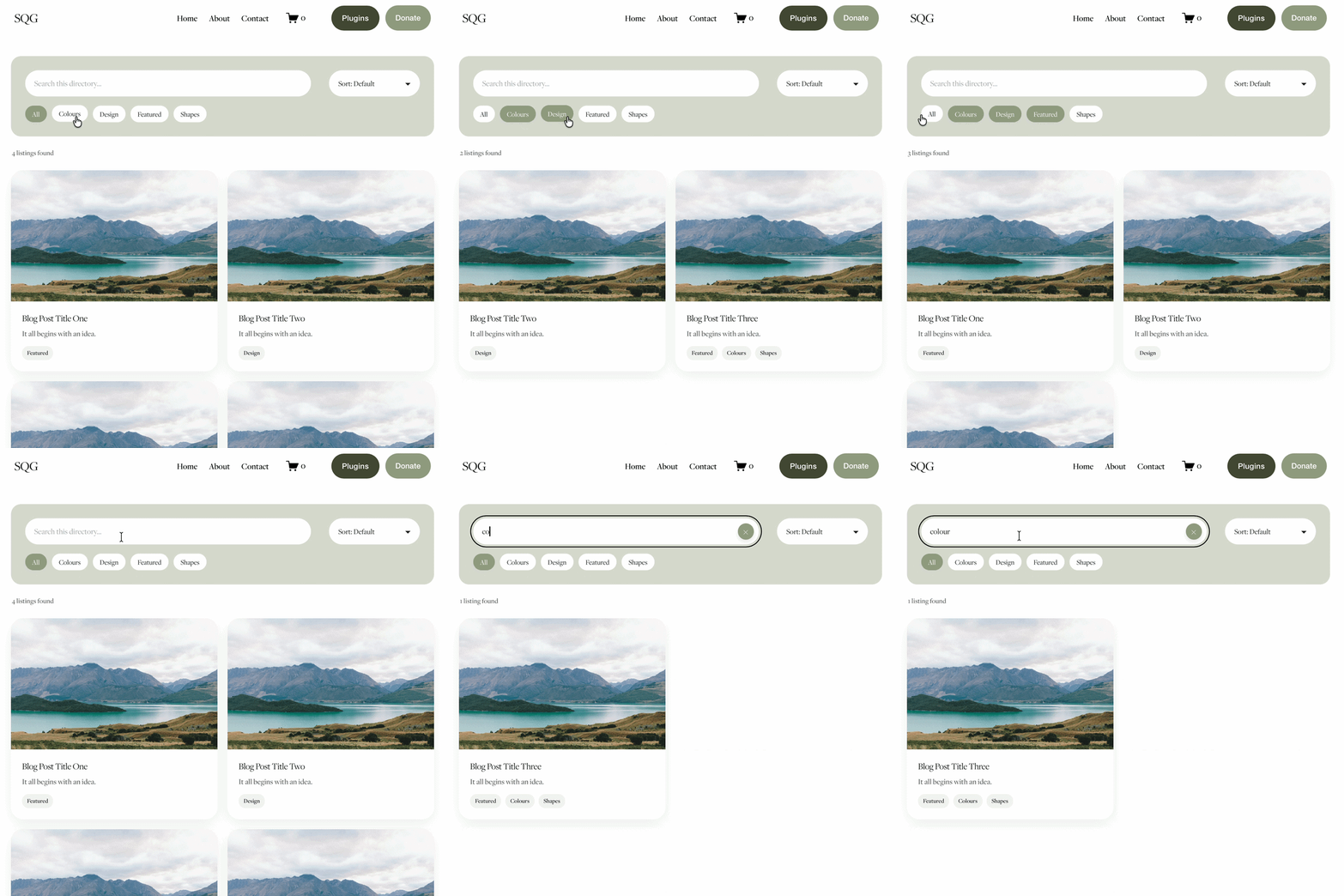
Filter buttons appear cleanly on the page, blending seamlessly into your existing Squarespace design. When a visitor clicks a filter, projects update instantly without reloading the page.
Price: £59.99 per site
Coding required: None — copy, paste, and go
Setup time: Under 10 minutes
→ Get the Genius Filter Plugin
Why photographers need filtering on their Squarespace portfolio
Most photography websites grow over time. What starts as a clean portfolio of 20 projects quickly becomes 60, 80, or 100. Without filtering, visitors have to scroll through everything to find what they're looking for — and most won't bother.
Filtering solves this in a few ways:
Better user experience. A wedding client visiting your site doesn't want to browse your commercial work. Filtering lets them land directly on what's relevant to them, making your site feel more professional and easier to navigate.
Higher enquiry rates. When a visitor can quickly find work that matches their brief, they're more likely to get in touch. Less scrolling, less friction, more enquiries.
A more polished first impression. The way your work is organised says as much as the work itself. A filtered, well-structured portfolio signals that you're organised, professional, and take your client experience seriously.
Does Universal Filter work on Squarespace portfolio pages?
No — and this is one of the most common pain points photographers run into. Universal Filter by Square Websites is a popular option for filtering blog posts and store products, but it does not support Squarespace portfolio pages. This is a known limitation that comes up regularly on the Squarespace Forum.
The Genius Filter Plugin was built to work natively with portfolio pages, making it the better choice for photographers who showcase their work in a portfolio collection.
How to add a filter to your Squarespace photography portfolio
Setting up the Genius Filter Plugin takes less than 10 minutes:
Purchase the plugin from thesquaregenius.com
Download the plugin files and open the setup guide (included)
Add your category tags to your portfolio projects inside Squarespace
Copy the plugin code into your Squarespace page header injection
Customise your filter button labels and colours to match your site
No developer needed. No ongoing subscription. One purchase, one site, forever.
Genius Filter Plugin vs other Squarespace filter options for photographers
| Plugin | Content types | No-code setup | One-time payment | Price |
|---|---|---|---|---|
|
Genius Filter Plugin Top pick |
Portfolio, blog, events, gallery blocks | ✓ Yes | ✓ Yes | £59.99 |
| Universal Filter | Portfolio, blog, products, events, gallery, albums | ⚠ Some coding | ✓ Yes | $89 |
| Squarepaste Portfolio Filter | Portfolio only | × No support | ✓ Yes | $45 |
| Custom code | Any | × No | ✓ Yes | Varies |
The Genius Filter Plugin is the only option that combines portfolio page support, a no-code setup, a one-time payment, and a beginner-friendly install process, making it the strongest choice for photographers who want filtering without the hassle.
Frequently Asked Questions
-
The best filter plugin for Squarespace photography portfolios in 2026 is the Genius Squarespace Filter Plugin by The Square Genius. It works directly on portfolio pages (unlike Universal Filter), requires no coding knowledge, and installs in under 10 minutes for a one-time cost of £59.99.
-
Yes, with a plugin. Squarespace doesn't offer native portfolio filtering, but the Genius Filter Plugin lets you add category-based filter buttons to any portfolio page. You define the categories yourself, so you can filter by genre, location, style, or anything else relevant to your photography.
-
No. Universal Filter by Square Websites does not currently support Squarespace portfolio pages because portfolio collections cannot be loaded into Summary blocks. The Genius Filter Plugin is specifically built to work with portfolio pages and is the recommended alternative.
-
The Genius Filter Plugin costs £59.99 for a multi-site licence, a one-time payment with no subscription. This is the most affordable filtering solution for Squarespace portfolio pages available in 2026.
-
No. The Genius Filter Plugin is designed for non-coders. Setup involves copying and pasting a short piece of code into your Squarespace page settings - no technical knowledge required. A step-by-step guide is included with every purchase.
-
Yes. The Genius Filter Plugin is built specifically for Squarespace 7.1 and works across portfolio pages, gallery blocks, blog posts, and event pages.
Ready to add filtering to your photography portfolio?
If you're a photographer on Squarespace and you want your visitors to be able to browse your work by category — without scrolling through everything — the Genius Filter Plugin is the simplest, most affordable way to do it.
The Square Genius builds simple, affordable plugins for Squarespace 7.1. Browse the full plugin range at thesquaregenius.com.
You might also find these articles helpful:
For more cool Squarespace tips check out my blog, or sign up to my newsletter.



Looking for an easy way to add filters to Squarespace?
The Genius Squarespace Filter Plugin helps you turn busy portfolio pages, blogs, event pages and galleries into a cleaner, easier to browse experience.
Visitors can quickly filter your content by category, topic, service, location, resource type or any labels you choose, instead of scrolling through everything.
Perfect for portfolios, blog archives, event listings, galleries (grid, masonry & strips only) resource hubs and larger content collections, this plugin gives your visitors a smoother way to explore your content without the cost or complexity of custom development.
Portfolio Filter Demo ➜
NEW Advanced Dropdown Portfolio Filter Demo ➜
Gallery Filter Demo ➜
Blog Filter Demo ➜
Event Filter Demo ➜
Key Features:
Simple to install and customise
Filter options for portfolio pages, galleries, blogs and events
Includes the new advanced dropdown portfolio filter
Ideal for Squarespace sites needing more in depth filtering options with a simple user experience
Beginner friendly setup with copy and paste instructions
Designed for Squarespace 7.1 websites